Password Attacks with Hydra

Before completing this lab, ensure you are working in a legal and safe environment. If you haven't already, you can set up your own hacking lab by completing our first tutorial:
Setting Up Your Free Virtual Hacking Environment
Now we are going to learn another famous Kali Linux tool:
Hydra
Hydra is a password testing tool used to audit login services.
It supports many protocols including:
- SSH
- FTP
- HTTP
- HTTPS
- Telnet
- SMB
- RDP
- and many more
Hydra is extremely popular because weak passwords are still everywhere.
And honestly, this is one of the biggest real-world security problems.
Organizations spend millions on security infrastructure while employees still use passwords like:
Summer2024
or:
Company123
That is not a technology problem.
That is a human problem.
What Hydra Actually Does
Hydra attempts username and password combinations against login services.
Example:
Username: admin
Password: password123
If the credentials are correct, Hydra reports a successful login.
This is called:
Credential Testing
Or:
Password Auditing
Hydra is useful for:
- identifying weak passwords,
- auditing authentication systems,
- testing account security,
- and understanding how login services behave.
Our Lab Setup
We will continue using:
- Kali Linux = attacker machine
- Metasploitable = target machine
Metasploitable intentionally includes weak services that are perfect for learning Hydra.
Step 1 – Start Both Virtual Machines
Open VMware.
Start:
- Kali Linux
- Metasploitable
Wait until both fully boot.
Log into Metasploitable with:
Username: msfadmin
Password: msfadmin
Step 2 – Find The Metasploitable IP Address
Inside Metasploitable, run:
ifconfig
Look for the IP address.
Example:
192.168.182.130
Write this IP down.
Step 3 – Scan The Target with Nmap
Before attacking services, we need to know what services exist.
Inside Kali Linux, run:
nmap TARGET-IP
Example:
nmap 192.168.182.130
You may see services like:
21/tcp open ftp
22/tcp open ssh
23/tcp open telnet
These are possible authentication targets.
Step 4 – Verify Hydra Is Installed
Hydra is usually included in Kali Linux.
Check by running:
hydra
If Hydra is installed, usage information will appear.
If not, install it:
sudo apt update
sudo apt install hydra
Step 5 – Understanding Wordlists
Hydra commonly uses wordlists.
A wordlist is a file containing possible usernames or passwords.
Example passwords:
password
admin
123456
letmein
football
Kali includes several wordlists.
One famous wordlist is:
rockyou.txt
Verify it exists:
ls /usr/share/wordlists/
If compressed, unzip it:
sudo gzip -d /usr/share/wordlists/rockyou.txt.gz
Step 6 – Create A Small Password List
For this beginner lab, we will create a small custom list.
Create a file:
nano passwords.txt
Add:
password
123456
msfadmin
admin
toor
Save:
CTRL + O
Press Enter.
Exit:
CTRL + X
Verify the file:
cat passwords.txt
Step 7 – Understanding FTP
FTP stands for:
File Transfer Protocol
It is an older file-sharing protocol.
Many old FTP services:
- allow weak passwords,
- transmit data insecurely,
- or expose anonymous access.
Metasploitable intentionally contains vulnerable FTP configurations.
Step 8 – Test FTP Credentials with Hydra
Now let’s test FTP logins.
Run:
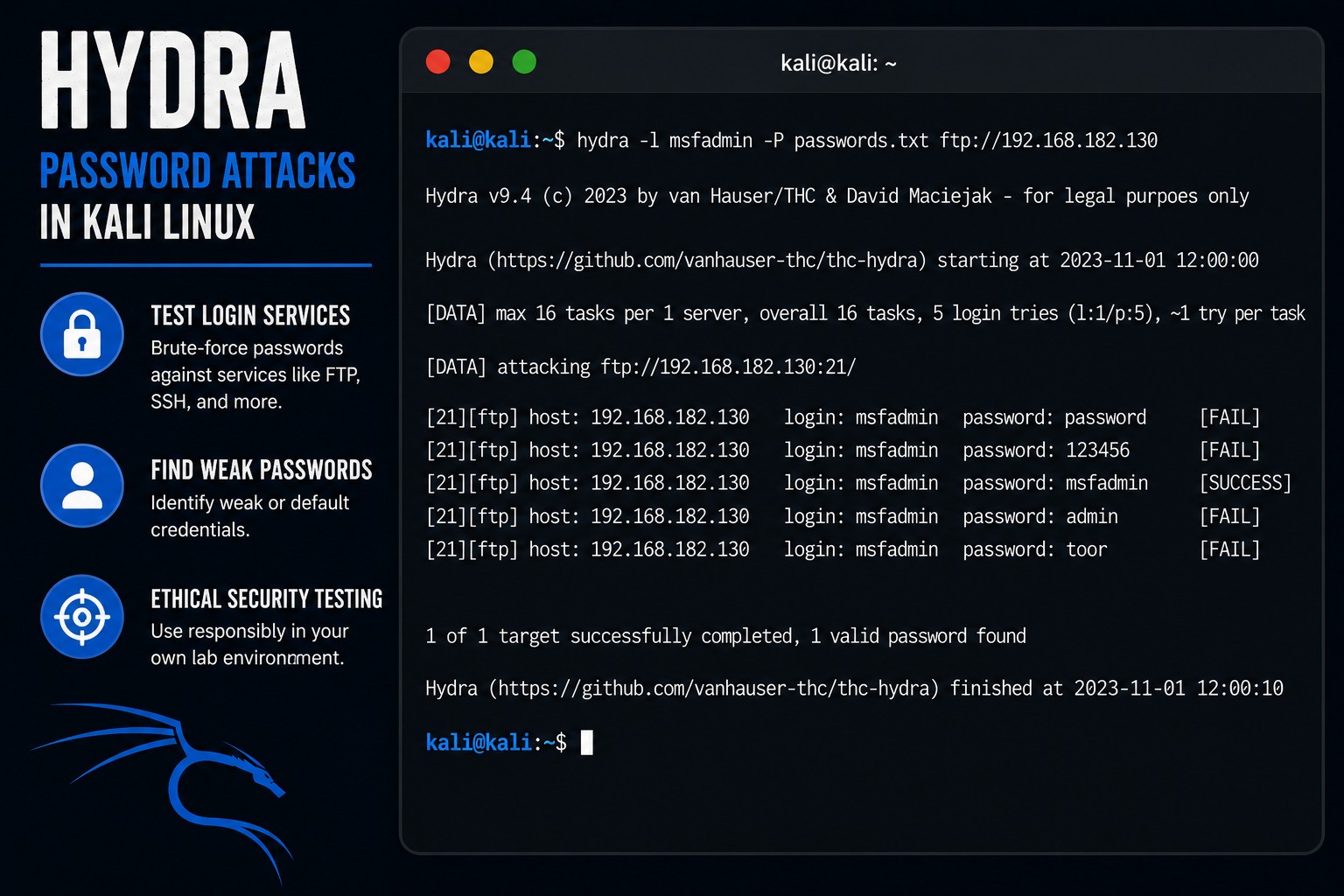
hydra -l msfadmin -P passwords.txt ftp://TARGET-IP
Example:
hydra -l msfadmin -P passwords.txt ftp://192.168.182.130
Let’s break this down:
| Option | Meaning |
|---|---|
-l | single username |
-P | password list |
ftp:// | target protocol |
Hydra will now test each password.
Step 9 – Understanding Successful Results
If Hydra succeeds, you may see:
[21][ftp] host: 192.168.182.130 login: msfadmin password: msfadmin
That means Hydra successfully authenticated.
This demonstrates weak password exposure.
Step 10 – Verify The Credentials Manually
Now verify manually using FTP.
Connect:
ftp TARGET-IP
Example:
ftp 192.168.182.130
When prompted:
Username: msfadmin
Password: msfadmin
If login succeeds, Hydra’s results were correct.
Step 11 – Exit FTP
Exit with:
bye
or:
exit
Step 12 – Understanding SSH
SSH stands for:
Secure Shell
SSH is commonly used for remote Linux administration.
Unlike FTP, SSH encrypts traffic.
But weak passwords are still dangerous.
Step 13 – Test SSH Credentials with Hydra
Now test SSH.
Run:
hydra -l msfadmin -P passwords.txt ssh://TARGET-IP
Example:
hydra -l msfadmin -P passwords.txt ssh://192.168.182.130
Hydra will begin testing credentials.
Step 14 – Verify SSH Login Manually
If Hydra succeeds, verify manually:
ssh msfadmin@TARGET-IP
Example:
ssh msfadmin@192.168.182.130
Enter the password when prompted.
If successful, you will receive shell access.
Exit SSH:
exit
Step 15 – Understanding Rate Limits
Real systems often include protections like:
- account lockouts,
- failed login delays,
- rate limiting,
- multi-factor authentication,
- intrusion detection,
- logging.
Metasploitable intentionally lacks many protections.
That is why it is useful for labs.
Step 16 – Use Multiple Usernames
Hydra can test multiple usernames too.
Create:
nano users.txt
Add:
admin
root
msfadmin
user
Save and exit.
Now run:
hydra -L users.txt -P passwords.txt ssh://TARGET-IP
This tests:
- multiple usernames,
- against multiple passwords.
Step 17 – Understanding Noise
Password attacks generate logs.
Authentication attempts are often monitored.
This is why excessive login failures may trigger:
- alerts,
- lockouts,
- investigations,
- or bans.
Professionals understand:
- visibility,
- logging,
- and detection.
Step 18 – Increase Thread Speed
Hydra supports threading.
Example:
hydra -t 4 -l msfadmin -P passwords.txt ssh://TARGET-IP
| Option | Meaning |
|---|---|
-t | number of threads |
Higher thread counts increase speed.
But aggressive attacks create more noise.
Step 19 – Save Hydra Results
Save output:
hydra -l msfadmin -P passwords.txt ssh://TARGET-IP -o hydra-results.txt
Read results:
cat hydra-results.txt
Professional testers document everything.
Step 20 – Why Weak Passwords Matter
Weak passwords remain one of the largest real-world security problems.
Because humans choose predictable passwords constantly.
Attackers rely heavily on:
- password reuse,
- default passwords,
- leaked credentials,
- weak authentication,
- and poor password policies.
Technology alone cannot fix bad password habits.
Step 21 – Common Beginner Mistakes
Using Giant Wordlists Immediately
Large lists take time.
Start small while learning.
Ignoring Account Lockouts
Real systems may lock accounts quickly.
Assuming Password Success Means Full Compromise
Authentication is only one step.
Blindly Running Tools
Understand:
- the protocol,
- the authentication process,
- and the service behavior.
Tools are not magic.
Step 22 – Useful Hydra Commands
FTP testing
hydra -l msfadmin -P passwords.txt ftp://TARGET-IP
SSH testing
hydra -l msfadmin -P passwords.txt ssh://TARGET-IP
Multiple usernames
hydra -L users.txt -P passwords.txt ssh://TARGET-IP
Save output
hydra -l msfadmin -P passwords.txt ssh://TARGET-IP -o results.txt
Increase threads
hydra -t 4 -l msfadmin -P passwords.txt ssh://TARGET-IP
Step 23 – Why Hydra Matters
Hydra teaches important concepts:
- authentication testing,
- password security,
- login protocols,
- weak credential risks,
- brute-force methodology,
- and attack visibility.
And honestly, understanding authentication weaknesses is critical in cybersecurity.
Because weak passwords continue causing enormous amounts of real-world compromises.
Closing Thoughts
Hydra is one of the most well-known password auditing tools in Kali Linux.
But the real lesson is not:
- “how to brute-force logins.”
The real lesson is understanding:
- why weak passwords fail,
- why password reuse is dangerous,
- why login protections matter,
- and why authentication security is critical.
This is why organizations now heavily rely on:
- password managers,
- MFA,
- account lockouts,
- rate limiting,
- and strong authentication policies.
In the next tutorials, we will continue exploring Kali Linux tools, web application vulnerabilities, and penetration testing concepts inside our hacking lab.
Please Subscribe to keep up with future tutorials, and always feel free to contact me or leave a comment below.